

For Australians who prefer playing on a phone or tablet, a casino’s mobile experience can matter as much as its games. Pages need to load reliably, menus should be easy to navigate, and payment and account tools must remain usable on a smaller screen. This review looks at Playzilla Casino from that practical perspective, while noting that availability, terms and services can change. Check the current site information and local rules before registering or depositing.
First impressions on a mobile device
Playzilla is designed to be accessed through a mobile browser, so players can visit the casino without necessarily installing a dedicated app. That approach is convenient for people who want to avoid downloading software, but the experience depends on the browser, device and internet connection. A current browser and a stable connection generally make for smoother navigation.
The main mobile priorities are straightforward: finding games, viewing account information and locating support. A compact layout can make these tasks easier than using a desktop site squeezed onto a phone. Still, players should take a moment to explore the menus before depositing. Check where the cashier, bonus conditions, account settings and responsible-play tools are located.
Finding games and navigating the lobby
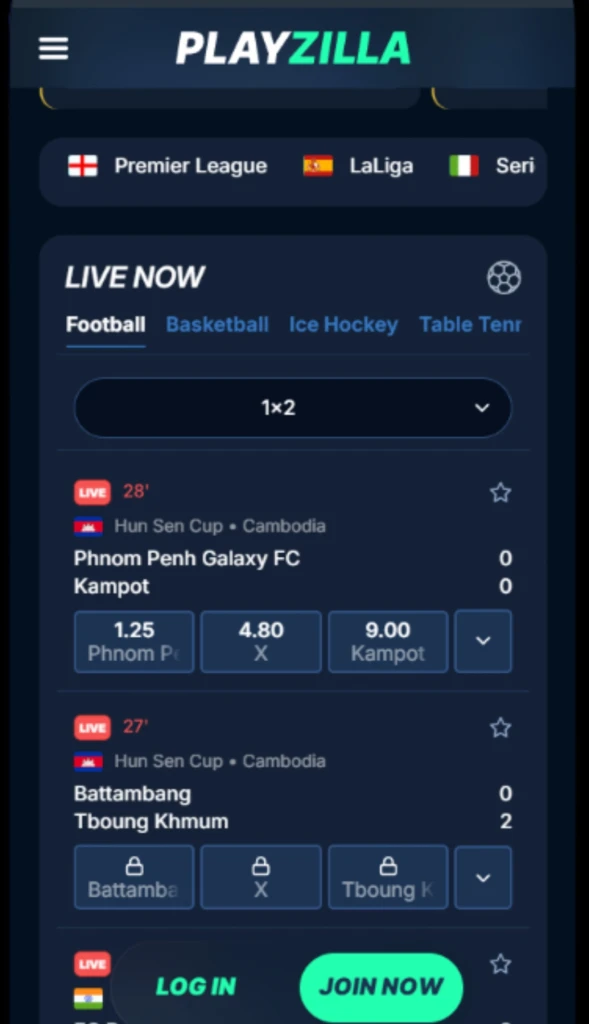
A casino lobby is most useful when it helps players browse without excessive scrolling. Categories and search tools can make it quicker to find a particular title or type of game. On a phone, search is especially helpful when a game catalogue contains many options. If a page feels crowded, rotating the device or adjusting browser zoom may improve readability, although zooming can also make buttons harder to use.
Game performance varies by provider and title. Some games are built to adapt neatly to a vertical screen; others are more comfortable in landscape mode. Loading times can also differ according to game features and network conditions; Before playing for real money, open a free-play or demo version where available. This gives you a chance to check controls, sound, screen fit and game rules without risking a deposit.
Practical checks before a session
- Use the official Playzilla website and confirm the address before entering login or payment details.
- Check that the game’s text, buttons and paytable are readable on your device.
- Review the rules and any bonus terms before wagering.
- Set a budget and a time limit before starting.
- Avoid playing over public Wi-Fi when entering sensitive account information.
Account access and security
Mobile convenience should not come at the expense of account security. Use a strong, unique password and keep your device’s operating system and browser updated. If you share a phone or tablet, log out when finished and avoid saving credentials in a browser that other people can access. Never share a one-time code or password with someone claiming to provide support.
If you have trouble signing in, check basic causes first: an incorrect password, a browser issue, or a temporary connection problem. Use the site’s official recovery process rather than links sent by strangers. For playzilla account access help, consult the casino’s current support and account-recovery options directly. Do not provide payment-card details or identity documents through unofficial channels.
Payments, bonuses and Australian considerations
Payment methods and currencies can vary by location and may change over time. Before making a deposit, inspect the cashier for the methods actually available to your account, along with minimum and maximum limits, processing times, fees and withdrawal requirements. A method that accepts deposits may not necessarily be available for withdrawals, so read the details rather than relying on assumptions.
Promotions can look attractive on a small screen, where important conditions may be hidden behind expandable panels. Read the full terms before opting in. Pay particular attention to wagering requirements, eligible games, contribution rates, expiry dates, maximum bet limits and withdrawal restrictions. A bonus is not the same as cash, and it may not suit someone who prefers to play without extra conditions.
Australian players should independently check the laws and restrictions that apply to them. Online gambling rules can differ according to the service offered and the player’s location, and a casino’s availability does not itself confirm that every activity is permitted. If anything is unclear, seek authoritative local information before creating an account or transferring money.
Mobile strengths and limitations
What works well
- Browser access: A mobile website can be convenient when you do not want to install an app.
- Flexible play: Phones and tablets allow access from different locations, subject to local rules and a reliable connection.
- Quick browsing: Search and game categories can shorten the process of finding a title.
- Small-session convenience: A mobile layout can make account checks and brief, planned sessions straightforward.
What to keep in mind
- Screen size: Game details and terms may be less comfortable to read on a phone.
- Connection dependence: A dropped connection can interrupt a game or payment process.
- Device differences: Performance can vary between browsers, operating systems and older hardware.
- Distractions: Playing on the go can make it easier to lose track of time or spending.
Responsible play on mobile
Phone access makes it particularly important to set limits before play begins. Decide how much money you can afford to lose and how long you intend to play. Keep gambling separate from essential expenses, and do not chase losses or borrow money to continue. If you notice that gambling is affecting your finances, mood or relationships, stop and seek help from a trusted person or a relevant support service in your area.
Where account tools are available, consider using deposit, loss or session limits. Take breaks and avoid gambling when tired, upset or under the influence of alcohol or other substances. Responsible-play features are most useful when set before a session, not after spending has exceeded your intended budget.
Questions and answers
Does Playzilla require a mobile app?
Playzilla can be accessed through a mobile browser, so a dedicated app may not be necessary. Confirm the current options on the official website, and avoid installing files from unofficial sources.
Can I play every game on a phone?
Compatibility depends on the specific game, device and browser. Check the title directly and try a demo if one is offered. Some games may be easier to use in landscape orientation or on a larger screen.
What should I do if a game freezes?
Do not immediately repeat a wager. Check your connection, refresh only when appropriate, and review your account or game history for the round’s status. If the result or balance is unclear, contact official support and provide the game title, approximate time and relevant transaction details.
How can I check a promotion’s real value?
Read all terms, including wagering, game eligibility, expiry and withdrawal conditions. Consider whether you would still want to play if the promotion were not offered. If the conditions are unclear, ask support before opting in.
Verdict
Playzilla’s browser-based mobile approach can suit Australian players who value convenient access without installing an app. Its usefulness ultimately depends on how well the lobby and games perform on an individual device, and whether the available payment and support options meet the player’s needs. The strongest approach is to test navigation and game readability first, examine account and bonus conditions carefully, and keep security and responsible-play limits in view. Treat mobile access as a convenient way to manage a planned session—not a reason to gamble more often or for longer.